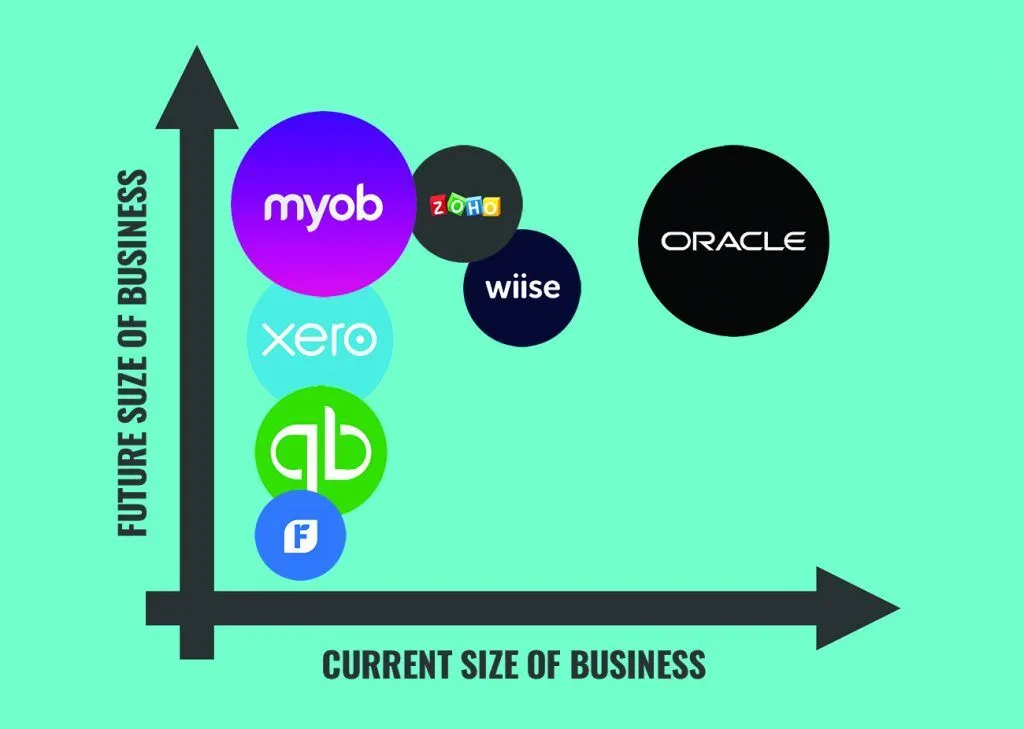
Choosing the right accounting tool can make a huge difference in how efficiently you manage your finances. With so many options available today, comparing bookkeeping platforms is essential before making a decision. The goal is not just to find the most popular software, but to find the one that best fits your business size, industry, budget, and workflow.
In this SEO-optimised guide, we’ll break down comparing popular bookkeeping software and which one fits your needs, including features, strengths, limitations, and ideal use cases.
Why Choosing the Right Bookkeeping Software Matters
Bookkeeping software is more than just a tool for recording transactions. It plays a central role in:
- Managing cash flow
- Tracking expenses and income
- Preparing tax reports
- Automating invoicing and payments
- Improving financial decision-making
The wrong software can slow you down, create errors, or cost unnecessary money. The right one can streamline operations and support business growth.
Popular platforms like QuickBooks Online, Xero, and FreshBooks dominate the market, but each serves different business needs.
Key Factors to Consider When Comparing Bookkeeping Software
Before choosing a platform, it’s important to evaluate it based on your business requirements.
1. Ease of Use
Some systems are designed for beginners, while others are built for accountants and advanced users.
2. Pricing
Costs vary depending on features, number of users, and business size.
3. Automation Features
Look for tools that automate invoicing, bank reconciliation, and expense tracking.
4. Reporting and Analytics
Strong reporting tools help you understand financial performance in real time.
5. Integrations
Software should connect with payment gateways, payroll systems, and CRM tools.
6. Scalability
Choose software that can grow with your business.
QuickBooks Online Overview
QuickBooks Online is one of the most widely used bookkeeping platforms globally, especially among small and medium-sized businesses.
Key Features:
- Advanced financial reporting
- Automated bank reconciliation
- Payroll integration
- Expense and invoice tracking
- Extensive third-party integrations
Pros:
- Highly scalable for growing businesses
- Strong reporting and analytics tools
- Large user community and support resources
Cons:
- Can be complex for beginners
- Higher pricing compared to some alternatives
Best For:
Businesses that need detailed reporting and advanced accounting features.
Xero Overview
Xero is a cloud-based accounting platform known for its clean interface and strong collaboration features.
Key Features:
- Real-time financial dashboards
- Easy bank reconciliation
- Multi-user access
- Inventory and payroll integration
- Automated invoicing
Pros:
- Very user-friendly interface
- Strong cloud collaboration tools
- Excellent integration options
Cons:
- Limited advanced reporting compared to competitors
- Some features require add-ons
Best For:
Small to medium-sized businesses that want simplicity and cloud-based collaboration.
FreshBooks Overview
FreshBooks is designed with freelancers, consultants, and small service-based businesses in mind.
Key Features:
- Easy invoicing and billing
- Time tracking for projects
- Expense management
- Basic financial reporting
- Mobile-friendly design
Pros:
- Extremely easy to use
- Great for service-based businesses
- Excellent customer support
Cons:
- Limited advanced accounting features
- Not ideal for larger businesses
Best For:
Freelancers, solopreneurs, and small service providers.
Side-by-Side Comparison
| Feature | QuickBooks Online | Xero | FreshBooks |
|---|---|---|---|
| Ease of Use | متوسط | High | Very High |
| Reporting | Advanced | Moderate | Basic |
| Automation | Strong | Strong | Moderate |
| Pricing | Higher | Mid-range | Affordable |
| Scalability | Excellent | Good | Limited |
| Best For | Growing businesses | SMBs | Freelancers |
Which Bookkeeping Software Should You Choose?
The best bookkeeping software depends entirely on your business needs.
Choose QuickBooks Online if:
- You need advanced reporting
- You manage a growing business
- You want full accounting features
Choose Xero if:
- You prefer a clean, simple interface
- You want strong cloud collaboration
- You run a small or medium-sized business
Choose FreshBooks if:
- You are a freelancer or solo entrepreneur
- You need simple invoicing and tracking
- You want ease of use over complexity
Cloud-Based Bookkeeping: The Modern Standard
Most modern bookkeeping tools are cloud-based, meaning you can access your financial data anywhere.
Benefits include:
- Real-time updates
- Automatic backups
- Remote collaboration
- Seamless integrations
Cloud platforms like QuickBooks Online and Xero have become industry standards due to their flexibility and security.
Common Mistakes When Choosing Bookkeeping Software
Many businesses make mistakes when selecting accounting tools.
1. Choosing Based on Price Alone
Cheaper isn’t always better if it lacks essential features.
2. Ignoring Scalability
Software that works today may not support future growth.
3. Overlooking Integrations
Lack of integrations can slow down workflows.
4. Not Testing the Software
Always try a demo before committing.
The Future of Bookkeeping Software
Bookkeeping software is evolving rapidly with new technologies.
Future trends include:
- AI-powered financial insights
- Fully automated reconciliation
- Predictive cash flow forecasting
- Voice-enabled accounting tools
- Smarter integrations across business systems
These advancements will make platforms like Xero, QuickBooks Online, and FreshBooks even more powerful and efficient.
Final Thoughts
Comparing bookkeeping software is essential to finding the right financial tool for your business. While QuickBooks Online offers advanced accounting features, Xero provides simplicity and collaboration, and FreshBooks excels in ease of use for freelancers.
There is no one-size-fits-all solution. The best choice depends on your business size, goals, and financial complexity.