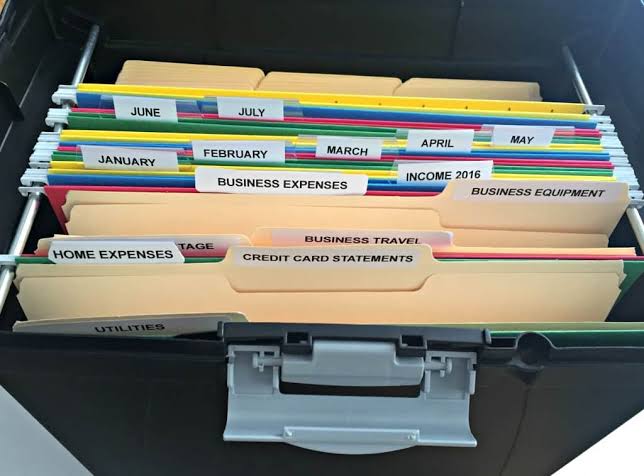
Keeping track of receipts is an important part of managing your small business finances. Whether you purchase office supplies, pay for software, travel for work or buy equipment, receipts provide valuable records of your business expenses.
However, receipts can quickly become difficult to manage. Paper receipts can be lost, emails can become buried in your inbox and digital receipts can end up scattered across different devices and folders.
Learning how to organise receipts for your small business can make bookkeeping easier, reduce stress and help you maintain accurate financial records. With a simple system and a consistent routine, you can keep your business receipts organised without spending hours sorting through paperwork.
Why Is It Important to Organise Business Receipts?
Business receipts provide evidence of purchases and expenses made by your business. Keeping them organised makes it easier to review transactions, maintain accurate bookkeeping records and provide supporting documentation when needed.
Organised receipts can also help you understand how your business is spending money. When receipts are easy to find, you can quickly investigate expenses, check purchases and identify areas where your business may be spending more than expected.
Poor receipt management, on the other hand, can result in missing records, duplicated expenses and unnecessary administrative work.
A good receipt organisation system gives you a central place to store your records and makes it easier to retrieve a document when you need it.
1. Keep Business and Personal Receipts Separate
One of the easiest ways to simplify receipt management is to keep business purchases separate from personal spending.
Using a dedicated business bank account or business payment method can make this much easier. When business purchases are made using business accounts, there is less confusion when reviewing transactions and matching receipts to expenses.
If you accidentally use a personal payment method for a business purchase, make sure you record the transaction correctly and keep the relevant receipt.
Separating business and personal expenses from the beginning can save significant time when completing your bookkeeping.
2. Create a Digital Receipt Storage System
Digital storage can make organising receipts much easier than relying entirely on physical paperwork.
Create a dedicated folder for business receipts in a secure cloud storage system or your preferred bookkeeping platform. You can then create subfolders based on the financial year, month or expense category.
For example, your structure might look like:
- Business Receipts
- 2026
- January
- February
- March
Alternatively, you could organise receipts by categories such as advertising, travel, office expenses, software and equipment.
Choose a system that makes sense for your business and stick with it. The most effective filing system is one that you can maintain consistently.
3. Scan or Photograph Paper Receipts
Paper receipts can fade, become damaged or get lost. Consider creating a digital copy as soon as possible after making a purchase.
You can use a smartphone to photograph or scan a receipt and save the digital copy in your receipt management system.
Make sure the image is clear and includes important information such as the date, supplier, items purchased and total amount.
Once you have confirmed that the digital copy has been saved correctly, you can store the original according to your record-keeping requirements.
Always check the applicable rules in your jurisdiction before disposing of original documents.
4. Use Consistent File Names
A consistent file naming system makes finding receipts much easier.
Instead of saving a document with a generic name such as “Receipt123.pdf,” use a name that tells you what the document contains.
For example:
2026-03-15_Officeworks_$125.50_Office-Supplies.pdf
A useful file name can include the date, supplier, amount and expense category.
You do not necessarily need to include every detail. The important thing is to develop a naming convention and use it consistently.
5. Organise Receipts by Expense Category
Sorting receipts by expense category can make it easier to review your business spending.
Common business expense categories may include:
- Office supplies
- Advertising and marketing
- Travel
- Professional services
- Software subscriptions
- Equipment
- Insurance
- Telephone and internet
- Vehicle expenses
Your categories should reflect your business activities and bookkeeping system.
Avoid creating an excessive number of categories. A simple, consistent structure is usually easier to maintain than a complicated system with dozens of folders.
If you are unsure how a particular expense should be categorised, ask your bookkeeper or accountant for guidance.
6. Match Receipts to Business Transactions
Organising receipts is only part of effective bookkeeping. You should also make sure receipts can be matched to the corresponding transactions in your accounting records.
For example, if your business bank account shows a $75 transaction, you should be able to identify the relevant receipt and understand what the purchase was for.
Many bookkeeping platforms allow you to attach receipts directly to transactions. This creates a useful digital record and makes future searches much easier.
Regularly matching receipts with transactions can also help you identify missing receipts or unusual transactions.
7. Deal With Email Receipts Immediately
Many businesses now receive receipts by email rather than on paper. While this is convenient, email receipts can easily get buried among hundreds of other messages.
Create a dedicated email folder or label for business receipts. When a receipt arrives, move it to the appropriate location immediately.
You can also download important receipts and store them in your main digital receipt system.
Avoid relying solely on your email inbox as your long-term filing system. A dedicated storage system makes your financial records easier to manage and access.
8. Set Aside Time Each Week
Receipt organisation becomes much easier when you make it part of your regular bookkeeping routine.
Set aside 15 to 30 minutes each week to review recent purchases and organise receipts.
During this time, you can:
- Upload new receipts
- Rename files
- Match receipts to transactions
- Categorise expenses
- Check for missing documents
- Review unusual purchases
Completing these tasks regularly prevents receipts from accumulating into a large administrative job at the end of the month or financial year.
9. Consider Bookkeeping Software
As your business grows, manually organising receipts can become increasingly time-consuming.
Bookkeeping software may allow you to connect business bank accounts, import transactions and attach digital receipts to expenses. Some systems also offer receipt scanning and automated transaction matching.
The right software depends on your business size, transaction volume and bookkeeping requirements.
Before choosing a system, consider whether it offers the features you actually need rather than selecting software simply because it has a large number of features.
Keep Your Receipt System Simple
The key to successful receipt management is consistency. You do not need a complicated system to keep your business receipts organised.
Start by separating business and personal expenses, creating a central digital storage location and developing a consistent file naming system. Then make receipt organisation part of your weekly bookkeeping routine.
Taking a few minutes to organise receipts regularly can save you considerable time later. It can also make it easier to understand your business expenses and maintain accurate financial records.
Final Thoughts
Learning how to organise receipts for your small business does not have to be difficult. A straightforward digital filing system, regular bookkeeping and consistent record keeping can make receipt management much more manageable.
Keep receipts in one organised location, make digital copies of paper documents, match receipts with transactions and review your records regularly.
As your business grows, consider using bookkeeping software or working with a professional bookkeeper to streamline the process.
Most importantly, start with a system that you can realistically maintain. The best receipt management system is not necessarily the most complicated one—it is the one you will consistently use.