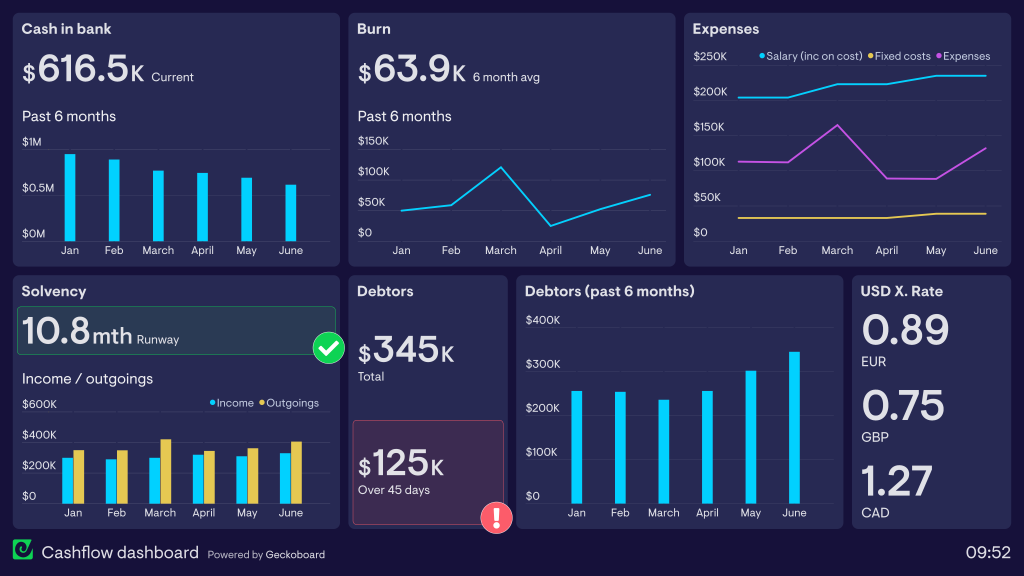
anaging your finances can feel overwhelming without a clear overview of your financial situation. That’s where a financial health dashboard comes in. A financial health dashboard is a personalized, visual tool that helps you track key financial metrics in one place, making it easier to monitor your money, set goals, and make informed decisions. In this guide, you’ll learn how to set up your own financial health dashboard step-by-step and start taking control of your financial future. How to Set Up a Financial Health Dashboard for Yourself
What is a Financial Health Dashboard?
A financial health dashboard is a centralized tool that consolidates your financial data, such as income, expenses, debts, savings, investments, and credit score. It provides a snapshot of your overall financial health and helps you identify trends, areas for improvement, and progress toward goals. Think of it as a dashboard in a car — giving you real-time information to navigate your finances smoothly.
Why You Need a Financial Health Dashboard
- Improves Financial Awareness: See your complete financial picture at a glance.
- Simplifies Money Management: Track all accounts and metrics without juggling multiple tools.
- Helps You Make Informed Decisions: Spot spending patterns, debt concerns, and savings opportunities.
- Motivates You to Reach Goals: Visual progress keeps you accountable and motivated.
- Prevents Financial Surprises: Early detection of issues like overspending or missed payments.
Setting up a dashboard helps you stay proactive and confident with your finances.
Step 1: Define Your Financial Goals and Key Metrics
Before building your dashboard, determine what you want to track and why.
Common financial goals include:
- Paying off debt
- Building an emergency fund
- Saving for a down payment
- Planning for retirement
- Tracking monthly expenses
- Growing investments
Key metrics to track:
- Income and cash flow
- Total expenses
- Debt balances and payments
- Savings account balances
- Investment portfolio value
- Net worth calculation
- Credit score and credit utilization
- Monthly budget adherence
Having clear goals and metrics will guide what data you include on your dashboard.
Step 2: Choose the Right Tools for Your Dashboard
You can create a financial health dashboard using various tools, depending on your preferences and tech comfort level.
Popular options:
- Spreadsheets: Excel or Google Sheets offer flexibility and customization.
- Personal Finance Apps: Mint, Personal Capital, YNAB (You Need A Budget), or Quicken provide integrated dashboards.
- Financial Aggregators: Services that link multiple accounts for real-time updates.
- Custom Dashboards: Build your own using tools like Microsoft Power BI or Google Data Studio (for advanced users).
For beginners, Google Sheets or Mint are great starting points due to their ease of use and free availability.
Step 3: Gather Your Financial Data
Collecting accurate, up-to-date data is critical for an effective dashboard.
Data to collect:
- Bank and credit card statements
- Loan and mortgage balances
- Investment account summaries
- Pay stubs and income records
- Credit reports and scores (available from free services)
- Monthly bills and recurring expenses
Make sure your data is organized by date and category for easier input and tracking.
Step 4: Set Up Your Dashboard Layout
Organize your dashboard for clarity and usability. Here’s a suggested layout:
Income and Expenses Section
- Total monthly income
- Total monthly expenses broken down by category (housing, food, transport, entertainment)
- Cash flow (income minus expenses)
Debt Overview
- Total debt balance
- Monthly debt payments
- Debt payoff progress bars or timelines
Savings and Investments
- Emergency fund balance
- Savings goals progress
- Investment portfolio value and returns
Net Worth Tracker
- Assets (cash, investments, property)
- Liabilities (debts, loans)
- Net worth calculation (assets minus liabilities)
Credit Health
- Current credit score
- Credit utilization ratio
- Recent credit activity summary
Include charts, graphs, and progress bars to visualize the data clearly.
Step 5: Automate Data Updates When Possible
Manual entry can be time-consuming and prone to errors. Automate your dashboard where possible:
- Use bank syncing features in finance apps.
- Import CSV files from banks or investment platforms.
- Link APIs for real-time updates (advanced option).
- Set up Google Sheets with scripts or integrations like Tiller Money for auto-updates.
Automation ensures your dashboard stays accurate and saves time.
Step 6: Review and Update Your Dashboard Regularly
A dashboard is only valuable if you use it consistently.
- Schedule a weekly or monthly review.
- Update any manually tracked data.
- Analyze trends and adjust budgets or goals as needed.
- Celebrate milestones to stay motivated.
Regular reviews help you catch problems early and maintain control.
Tips for Creating an Effective Financial Health Dashboard
- Keep it Simple: Avoid clutter; focus on key metrics that matter to you.
- Use Visuals: Charts and graphs enhance understanding and engagement.
- Customize for Your Goals: Tailor the dashboard to reflect your personal priorities.
- Ensure Data Accuracy: Double-check inputs and update regularly.
- Secure Your Data: Use strong passwords and avoid sharing sensitive information publicly.
Benefits of Using a Financial Health Dashboard
- Better Financial Decision-Making: Clear data helps you prioritize spending, saving, and investing.
- Increased Accountability: Visual progress motivates consistent good habits.
- Reduced Financial Stress: Confidence grows when you know where your money stands.
- Goal Achievement: Tracking milestones boosts your chances of success.
- Long-Term Financial Security: Proactive management prevents crises and builds wealth.
Common Challenges and How to Overcome Them
Challenge 1: Time Consuming Setup
Solution: Start simple with a basic spreadsheet or app, then expand features gradually.
Challenge 2: Data Overload
Solution: Focus on essential metrics to avoid overwhelm.
Challenge 3: Keeping Data Updated
Solution: Automate wherever possible and set reminders for manual updates.
Conclusion: Take Control with Your Financial Health Dashboard
Setting up a financial health dashboard empowers you to take control of your money. By defining your goals, choosing the right tools, gathering data, and regularly reviewing your dashboard, you’ll gain clarity, confidence, and motivation to improve your financial well-being. Whether you use a simple spreadsheet or an advanced app, the key is consistency and customization. Start building your financial health dashboard today and watch your financial future become brighter and more secure.